The Invoice Creator

Comparison

An Invoice-Generator.com alternative that never uploads your invoice

Invoice-Generator.com is a long-running free invoice tool. The Invoice Creator is a newer one built around a single idea: your clients' details never leave your device. Here is what each does, side by side, so you can pick the right one for your work.

  • Free forever, unlimited
  • No sign-up to download
  • PDF built on your device
  • Trade templates built in

Facts checked: 25 November 2026

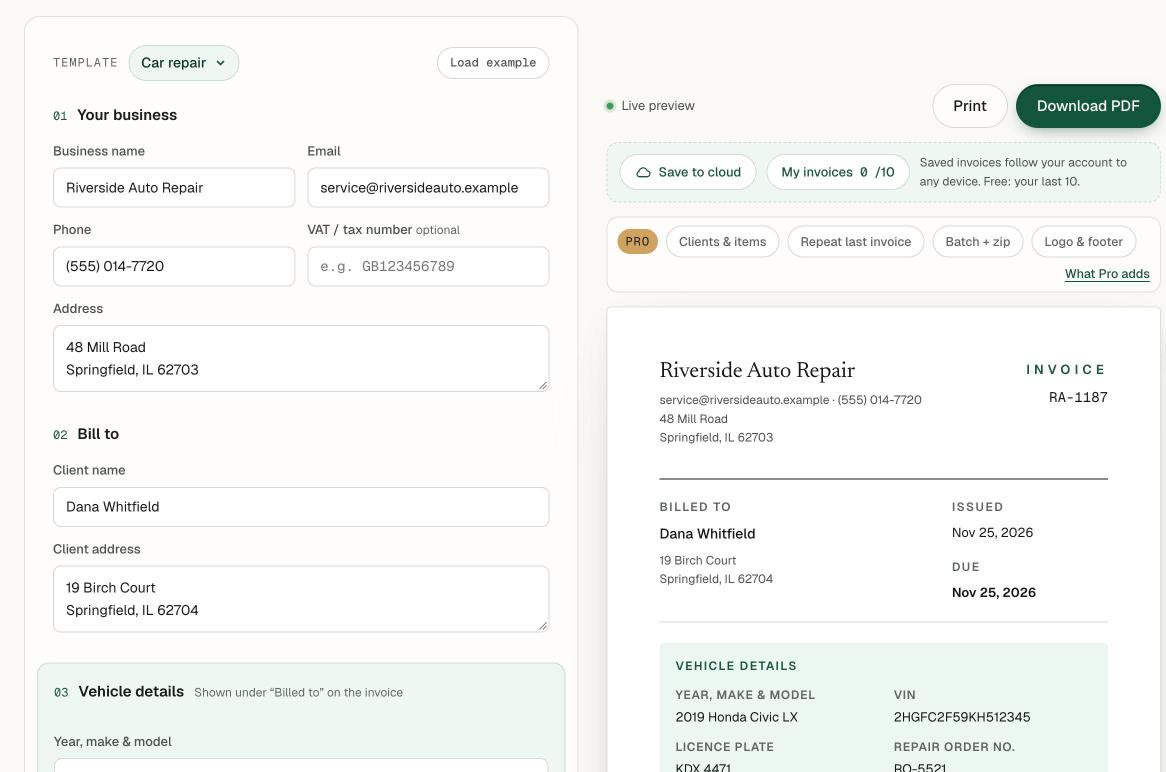
The Invoice Creator with the car repair template loaded: business and client details on the left, live invoice preview on the right
The Invoice Creator with the car repair template. Everything on this screen stays in your browser.

The short answer

Both are free. They solve different problems.

Invoice-Generator.com is broader: more document types, more currencies and languages, a developer API, and an account if you want to send invoices and take payments. The Invoice Creator is narrower and more private: the PDF is assembled on your own device, nothing you type is uploaded, and it adds trade-specific fields a general form does not have.

Choose Invoice-Generator.com if you

  • want to generate invoices from your own software through an API
  • also need quotes, receipts, credit notes or purchase orders
  • want to email the invoice and take card payments from the same tool
  • invoice in a currency or interface language we do not offer

Choose The Invoice Creator if you

  • do not want clients' names, addresses or bank details on anyone's server
  • bill as a garage, consultant, freelancer, cleaner or groomer and want those fields built in
  • need tax on parts only, subtotals per category or a balance after a deposit
  • also need to turn photos or several PDFs into one PDF

Where your data goes

Nothing you type is sent to a server

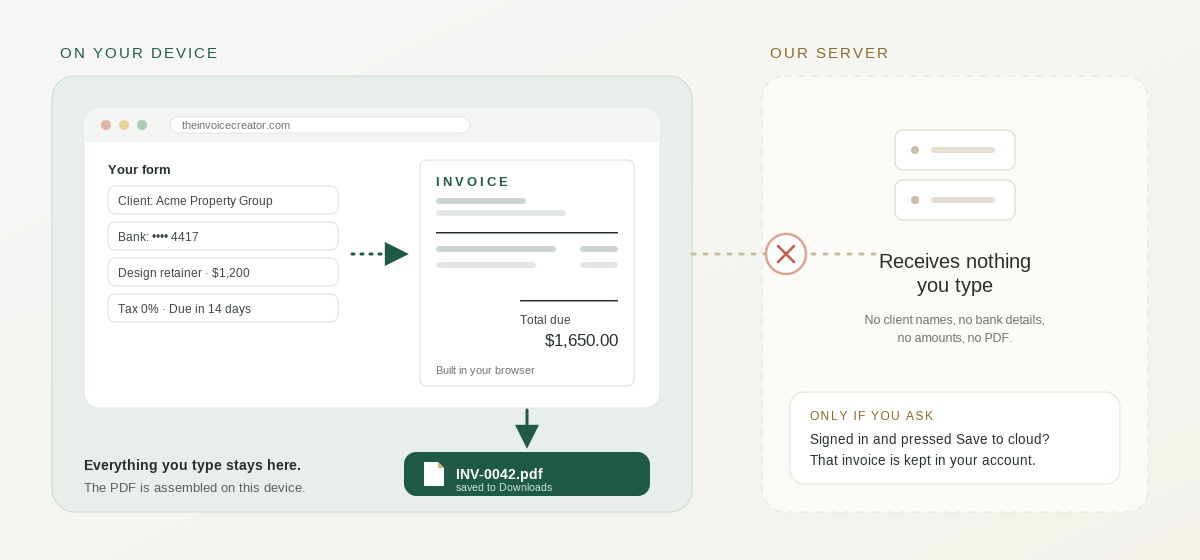
The invoice form and the PDF both live in your browser. Your clients' names, addresses, bank details and amounts are never transmitted, so there is no copy of them anywhere but your own device. The only exception is one you choose: sign in and press Save to cloud.

Diagram: the invoice form and PDF are built on your device and saved to Downloads; our server receives nothing you type unless you sign in and save an invoice to your account
How The Invoice Creator handles an invoice. The same applies to the invoice to PDF converter.

Side by side

Invoice-Generator.com vs The Invoice Creator

Checked against each site's own pages on 25 November 2026. Features change; if something here is out of date, email us and we will correct it.

Invoice-Generator.comThe Invoice Creator
Make and download invoices✓Free, no limits✓Free forever, no limits
Download without an account✓Yes✓Yes
PDF assembled on your own device~Not stated on the pages we checked✓Yes, nothing you type is uploaded
Your logo on a free invoice✓Yes✓Yes, free
Currencies✓About 150 ISO currencies~11 common currencies
Interface languages✓More than 15~English
Quotes, receipts, credit notes, purchase orders✓About a dozen document types✕Invoices only
Send invoices and take payments online✓With a free account✕You send the PDF yourself
Trade fields (VIN, PO number, project balance)One general invoice form✓Five trade templates
Keep invoices across devices✓With an account✓Free sign-in keeps your last 10
Developer API✓Yes, free up to 100 invoices a month✕No
Online since20122026

Sources: invoice-generator.com home page, Help page and Developer API page, read on 25 November 2026. “Not stated” means we could not find it on those pages, not that the feature is missing.

What is different

Three things a general invoice form does not do

If a plain invoice is all you need, either tool will do. These are the cases where The Invoice Creator saves real time.

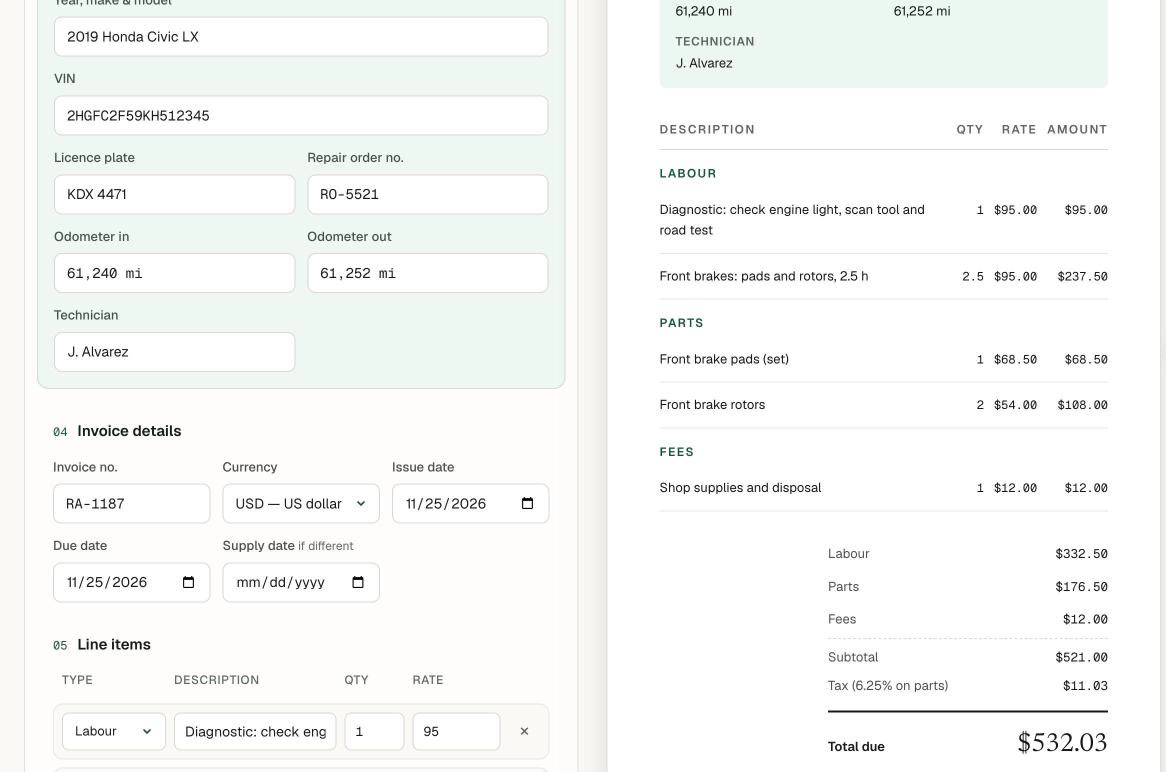
Car repair invoice with vehicle details, labour, parts and fees grouped, subtotals per group and tax charged on parts only

01 · Built for your trade

Labour, parts and fees, each with its own subtotal

A garage invoice the customer can follow line by line.

Pick a trade template and the form adds the fields that trade needs. Lines are tagged and grouped with a subtotal for each group, and tax can be charged on one group only, which is how many US states tax car repairs.

  • Car repair: VIN with a 17-character check, plate, odometer in and out, technician
  • Consultant: PO number, statement of work, service period
  • Freelancer: project total, invoiced before, remaining balance worked out for you
  • Cleaning and dog grooming: service address, frequency, pet details, next appointment
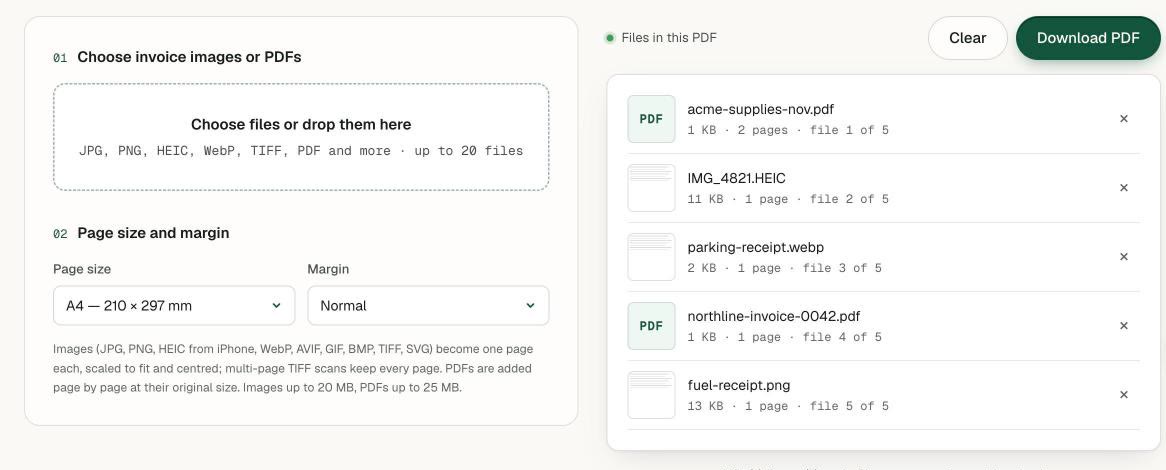
Invoice to PDF converter with PDF invoices, an iPhone HEIC photo, a WebP receipt and a PNG receipt combined into one six-page PDF

02 · Paper and PDFs too

Photos, scans and PDF invoices in one file

Month-end expenses for your bookkeeper in one PDF.

The invoice to PDF converter takes PDFs, iPhone HEIC photos, JPG, PNG, WebP and TIFF scans, and combines them in the order you add them. Like the invoice creator, it works on your device.

  • Up to 20 files in one go
  • PDFs keep their original page size
  • Images are scaled to A4 or US Letter
  • Password-protected PDFs are flagged, not silently dropped
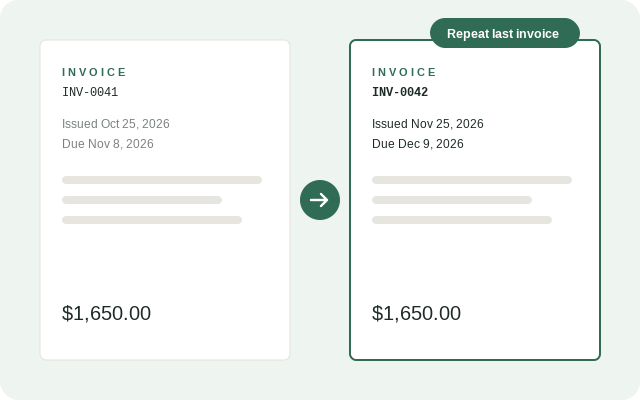
Saved invoice INV-0041 copied to INV-0042 with today's date by the Repeat button

03 · Same client every month

Repeat last month's invoice in one click

Retainers and contracts done in under a minute.

Your browser remembers your last invoice, and a free sign-in keeps your last 10 on any device. With Pro, Repeat copies a saved invoice with today's date and the next number in your own format, and saved clients fill themselves in.

  • INV-0042 becomes INV-0043, 2026-17 becomes 2026-18
  • Payment terms and the gap to the due date are kept
  • Nothing is emailed or charged automatically

Switching

Moving over takes about two minutes

There is nothing to import or set up. Your details are remembered in your browser after the first invoice.

  1. 1

    Open the invoice creator

    No account, no email. A filled-in example shows you what you are about to make.

  2. 2

    Pick your trade

    General, car repair, consultant, freelancer, cleaning or dog grooming, from the Template menu.

  3. 3

    Type your details once

    Business details are remembered for next time on that device.

  4. 4

    Download the PDF

    Built on your device and saved to Downloads, ready to email or print.

Why people look for an Invoice-Generator.com alternative

Invoice-Generator.com has been around since 2012 and does its main job well: you fill in one form and download an invoice, free and without an account. People who go looking for something else usually want one of three things it is not built around.

The first is privacy. If you invoice landlords, patients' families or private clients, you may not want their names, addresses and amounts passing through a third party at all. The Invoice Creator builds the invoice and the PDF inside your browser, so there is nothing to pass through.

The second is trade detail. A general form treats every line the same. A garage needs labour and parts kept apart with tax on parts only; a consultant needs the client's PO number; a freelancer wants the project balance after this invoice. Those fields are built into The Invoice Creator's templates.

The third is paperwork that is not an invoice you made yourself: a supplier's PDF, a photo of a fuel receipt, a scan from a phone. The invoice to PDF converter puts all of those into one file.

What Invoice-Generator.com does well

It is fair to say what you would give up. Invoice-Generator.com offers about 150 currencies and more than 15 interface languages, lets you add a logo for free, and covers around a dozen document types, from quotes and receipts to credit notes and purchase orders. With a free account you can email invoices and accept card or bank payments, and developers can generate invoices through its API. If you need any of that, it is the better choice.

What The Invoice Creator does differently

It does fewer things and keeps your data closer. Making and downloading invoices needs no account and sends nothing you type to a server. The PDF carries only your details, with no watermark and no branding of ours. Trade templates add the fields a real job needs, and the live preview shows exactly what the client will see.

If you bill the same clients every month, a free sign-in keeps your last 10 invoices on any device. Pro adds the time-savers: a client library, one-click repeat invoices with the next number, batch downloads in one zip, and a footer line on every page, with your logo and footer kept on every device. Adding your logo is free.

Price

Both tools are free for making and downloading invoices, with no limit. Invoice-Generator.com's API has a free tier of 100 invoices a month and paid plans beyond that. The Invoice Creator has an optional Pro plan at $9 a month or $79 a year; nothing free is taken away if you never use it.

Which should you use?

Use Invoice-Generator.com when you want one tool to make, send and collect payment on invoices, or when you need other business documents. Use The Invoice Creator when you want a correct invoice in a minute, built for your trade, without handing your clients' details to anyone.
Make your next invoice without uploading it

Free forever, no account, a PDF in under a minute.

Frequently asked questions

Is The Invoice Creator free in the same way as Invoice-Generator.com?
Yes for making and downloading invoices: no account, no limit, no watermark, free forever. The optional Pro plan ($9 a month or $79 a year) adds saved clients, one-click repeat invoices, batch downloads and a footer line. Both tools let you put your logo on an invoice for free.
Can I bring my invoices over from Invoice-Generator.com?
There is no import. Most people open their last invoice next to the form and retype it once; after that your business details are remembered in your browser, and a free sign-in keeps your last 10 invoices so you can reopen and edit them.
Does either tool keep a copy of my invoices?
The Invoice Creator only keeps an invoice if you sign in and press Save to cloud; otherwise the details stay in your own browser. Invoice-Generator.com stores invoices in its cloud when you use its account to send them. For anything else, check each tool's own privacy policy.
Which is better for a small auto repair shop?
The Invoice Creator's car repair template was built for that job: VIN, plate and mileage on the invoice, labour, parts and fees grouped with subtotals, and sales tax on parts only. If you also want customers to pay by card from the invoice, Invoice-Generator.com's account features or a shop management system will suit you better.
Can I take card payments with The Invoice Creator?
No. It produces the PDF; you send it and the client pays you the way you agreed, such as bank transfer. Put your payment details in the notes field and they appear on every invoice.